
Blog Details Component
The Blog Details component is a complete article layout used for rendering individual blog posts.
It provides a professional reading experience with support for:
- Cover images
- Article metadata
- Author information
- Category tags
- Publication dates
- Back navigation
- MDX-powered article content
Import the component using:
import BlogDetails from "@/components/ui/blogDetails";Features
- Hero cover image
- Article metadata
- Author profile section
- Back navigation
- Responsive layout
- Next.js image optimization
- MDX content support
- SEO-friendly article pages
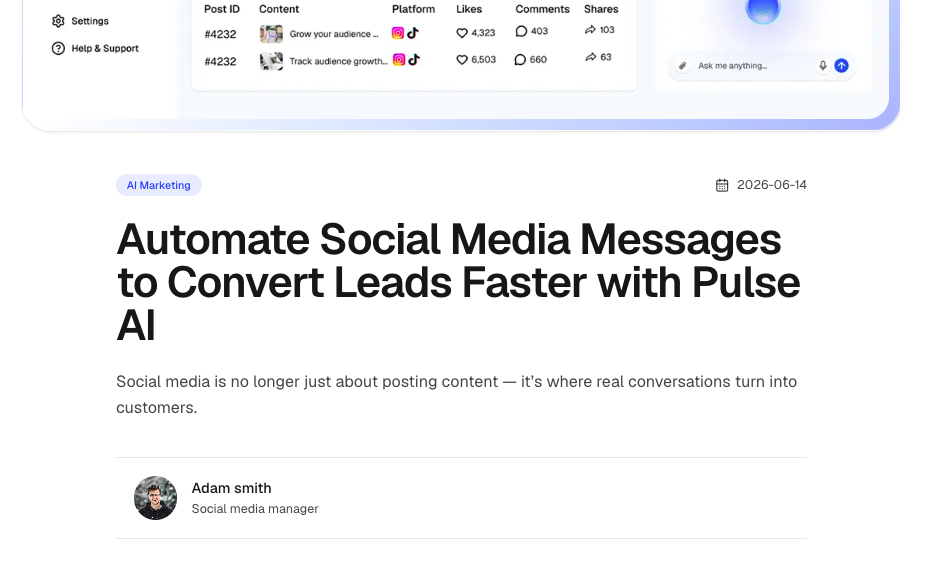
Preview Structure
┌──────────────────────────┐
│ Back Navigation          │
├──────────────────────────┤
│ Cover Image              │
├──────────────────────────┤
│ Category + Date          │
│ Article Title            │
│ Article Description      │
├──────────────────────────┤
│ Author Information       │
├──────────────────────────┤
│ Article Content (MDX)    │
└──────────────────────────┘
Preview
Basic Usage
<BlogDetails
  title="Building a Modern SaaS Application"
  tag="Development"
  tagline="Learn the architecture, tooling, and best practices behind modern SaaS applications."
  publishedDate="May 24, 2026"
  authorName="John Doe"
  authorTitle="Founder & Developer"
  authorImageUrl="/authors/john.jpg"
  coverImage="/blog/saas.jpg"
/>
Article Data Structure
A typical blog article object may look like this:
{
  title: "Building a Modern SaaS Application",
  tag: "Development",
  tagline: "Learn the architecture, tooling, and best practices behind modern SaaS applications.",
  publishedDate: "May 24, 2026",
  authorName: "John Doe",
  authorTitle: "Founder & Developer",
  authorImageUrl: "/authors/john.jpg",
  coverImage: "/blog/saas.jpg",
  slug: "building-modern-saas"
}
Rendering Article Content
The Blog Details component only handles the article layout and metadata.
The actual article content is typically rendered below the component.
Example:
<BlogDetails {...post} />

<article className="prose mx-auto max-w-3xl">
  <BlogContent />
</article>
Using MDX Content
Pulse AI ships with support for MDX, making it easy to write articles directly inside your project.
Example structure:
content/
└── blog/
    ├── building-modern-saas.mdx
    └── startup-growth-guide.mdx
Example article:
# Building a Modern SaaS Application

Modern SaaS products require scalability,
maintainability, and excellent user experience.

## Choosing a Tech Stack

Next.js provides an excellent foundation.
Then render it inside your page:
import { mdxComponents } from "@/components/mdx/mdx-components";

<BlogDetails {...post} />

<article className="prose mx-auto max-w-3xl">
   <MDXRemote source={content}
  components={mdxComponents} />
</article>
Upgrading to a CMS
As your project grows, you may want to manage content outside your codebase.
The Blog Details component works well with headless CMS platforms such as:
- Sanity
- Contentful
- Strapi
- Hygraph
- Payload CMS
- Ghost
In these setups:
- The CMS provides article data
- Blog Details renders metadata
- Rich content is rendered from the CMS response
Example flow:
CMS
 ↓
Article Data
 ↓
Blog Details Component
 ↓
Rich Content Renderer
Custom Back Navigation
Override the default blog route.
<BlogDetails
  {...post}
  backHref="/resources"
  backLabel="Back to Resources"
/>
Props
title
Main article heading.
title="Building a Modern SaaS Application"tag
Article category.
tag="Development"tagline
Short article summary.
tagline="Learn the architecture, tooling, and best practices behind modern SaaS applications."publishedDate
Publication date.
publishedDate="May 24, 2026"authorName
Author display name.
authorName="John Doe"authorTitle
Author role or position.
authorTitle="Founder & Developer"authorImageUrl
Author profile image.
authorImageUrl="/authors/john.jpg"coverImage
Featured article image.
coverImage="/blog/saas.jpg"backHref
Custom navigation destination.
backHref="/resources"backLabel
Custom navigation text.
backLabel="Back to Resources"Available Props
interface BlogDetailsProps {
  title: string;
  tag: string;
  tagline: string;
  publishedDate: string;
  authorName: string;
  authorTitle: string;
  authorImageUrl: string;
  coverImage: string;
  backHref?: string;
  backLabel?: string;
}
Recommended Folder Structure
content/
└── blog/
    ├── article-one.mdx
    ├── article-two.mdx
    └── article-three.mdx

app/
└── blog/
    └── [slug]/
        └── page.tsx

components/
└── layout/
    └── blog_details.tsx
Summary
The Blog Details component provides a complete article layout for Pulse AI.
It is designed to work with:
- MDX articles
- Local content files
- Static blog systems
- Headless CMS platforms
- Large content-driven websites
Start with MDX for simplicity and upgrade to solutions like Sanity or Contentful whenever your content workflow requires it.