
Card Image Component
The CardImg component is a flexible content card designed to display an image, title, description, and optional call-to-action button.
It is ideal for:
- Feature sections
- Service cards
- Integration showcases
- Marketing content
- Product highlights
- Benefits sections
Import the component using:
import CardImg from "@/components/ui/cardImg";Preview
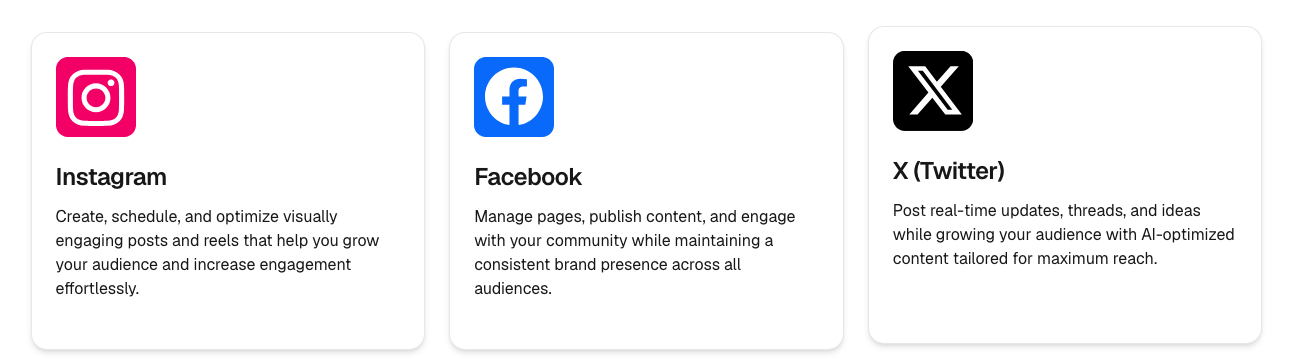
Features
- Image support
- Optional descriptions
- Optional CTA button
- Button links
- Multiple alignment options
- Responsive design
- Custom styling support
Basic Usage
<CardImg
  image="/icons/rocket.svg"
  title="Launch Faster"
/>
Complete Example
<CardImg
  image="/icons/rocket.svg"
  title="Launch Faster"
  description="Build and ship products quickly using reusable components."
  buttonText="Learn More"
  buttonHref="/features"
/>
Data Structure
A typical card object may look like this:
{
  image: "/icons/rocket.svg",
  title: "Launch Faster",
  description: "Build and ship products quickly using reusable components.",
  buttonText: "Learn More",
  buttonHref: "/features"
}
Rendering Multiple Cards
Store your cards in a content file:
export const featureCards = [
  {
    image: "/icons/rocket.svg",
    title: "Launch Faster",
    description: "Build and ship products quickly using reusable components.",
    buttonText: "Learn More",
    buttonHref: "/features",
  },
];
Then render them:
{featureCards.map((card) => (
  <CardImg
    key={card.title}
    {...card}
  />
))}
Grid Example
<div className="grid gap-6 md:grid-cols-2 lg:grid-cols-3">
  {featureCards.map((card) => (
    <CardImg
      key={card.title}
      {...card}
    />
  ))}
</div>
Image Alignment
Control where the image appears inside the card.
Left
<CardImg
  image="/icons/rocket.svg"
  title="Launch Faster"
  alignImg="left"
/>
Center
<CardImg
  image="/icons/rocket.svg"
  title="Launch Faster"
  alignImg="center"
/>
Right
<CardImg
  image="/icons/rocket.svg"
  title="Launch Faster"
  alignImg="right"
/>
Content Alignment
Control the alignment of the text content.
Left
<CardImg
  image="/icons/rocket.svg"
  title="Launch Faster"
  alignContent="left"
/>
Center
<CardImg
  image="/icons/rocket.svg"
  title="Launch Faster"
  alignContent="center"
/>
Right
<CardImg
  image="/icons/rocket.svg"
  title="Launch Faster"
  alignContent="right"
/>
Adding a Button
The button only renders when buttonText is provided.
<CardImg
  image="/icons/rocket.svg"
  title="Launch Faster"
  buttonText="Learn More"
/>
Adding a Button Link
Provide both buttonText and buttonHref.
<CardImg
  image="/icons/rocket.svg"
  title="Launch Faster"
  buttonText="Learn More"
  buttonHref="/features"
/>
Button Variants
Primary
<CardImg
  image="/icons/rocket.svg"
  title="Launch Faster"
  buttonText="Get Started"
  buttonVariant="primary"
/>
Secondary
<CardImg
  image="/icons/rocket.svg"
  title="Launch Faster"
  buttonText="Get Started"
  buttonVariant="secondary"
/>
Outline
<CardImg
  image="/icons/rocket.svg"
  title="Launch Faster"
  buttonText="Get Started"
  buttonVariant="outline"
/>
Available Props
interface CardImgProps {
  image: string;
  imageAlt?: string;

  title: string;
  description?: string;

  alignImg?: "left" | "center" | "right";
  alignContent?: "left" | "center" | "right";

  buttonText?: string;
  buttonHref?: string;

  buttonVariant?: "primary" | "outline" | "secondary";

  className?: string;
  imageClassName?: string;
}
Props
image
Card image source.
image="/icons/rocket.svg"imageAlt
Custom image alt text.
imageAlt="Rocket Icon"title
Main card heading.
title="Launch Faster"description
Supporting card text.
description="Build and ship products quickly using reusable components."alignImg
Controls image alignment.
alignImg="center"Available values:
left
center
right
alignContent
Controls content alignment.
alignContent="center"Available values:
left
center
right
buttonText
CTA button label.
buttonText="Learn More"buttonHref
CTA button destination.
buttonHref="/features"buttonVariant
Controls button style.
buttonVariant="primary"Available values:
primary
secondary
outline
className
Apply custom card styling.
<CardImg
  className="shadow-xl"
  {...card}
/>
imageClassName
Customize image container styling.
<CardImg
  imageClassName="h-24 w-24"
  {...card}
/>
Common Use Cases
Features Section
<CardImg {...feature} />Services Grid
<CardImg {...service} />Integrations Showcase
<CardImg {...integration} />Benefits Section
<CardImg {...benefit} />Product Highlights
<CardImg {...highlight} />Summary
The CardImg component is a versatile content card that combines imagery, content, and call-to-actions into a clean reusable layout.
Use it for:
- Features
- Services
- Integrations
- Product highlights
- Benefits
- Marketing sections
Add optional buttons, customize alignment, and render dynamic data with minimal setup.