
IconCard
A reusable card component for displaying features, benefits, services, and product highlights using an icon, title, and description.
The component supports flexible icon alignment, content alignment, optional links, and hover interactions.
Import the component using:
import IconCard from "@/components/ui/iconCard";Preview
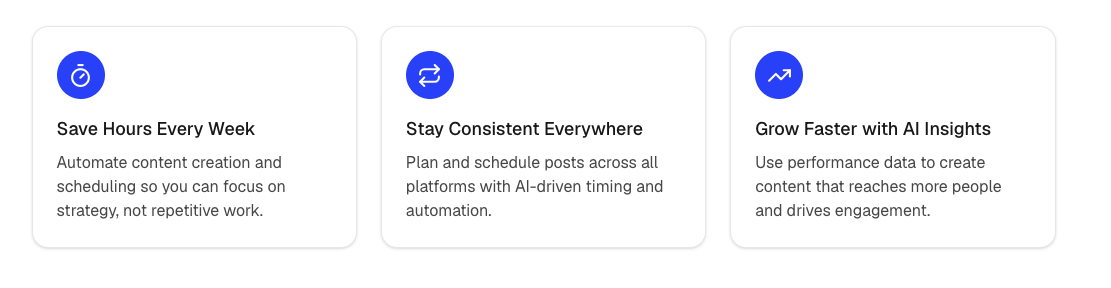
Example
import { Zap } from "lucide-react";

<IconCard
  title="Lightning Fast"
  description="Deliver content instantly with optimized performance."
  icon={Zap}
/>
Alignment Example
import { Shield, Rocket, Globe } from "lucide-react";

<div className="grid gap-6 md:grid-cols-3">
  <IconCard
    title="Secure"
    description="Enterprise-grade security."
    icon={Shield}
    iconAlignment="left"
    contentAlignment="left"
  />

  <IconCard
    title="Fast Deployment"
    description="Launch projects in minutes."
    icon={Rocket}
    iconAlignment="center"
    contentAlignment="center"
  />

  <IconCard
    title="Global Reach"
    description="Serve customers worldwide."
    icon={Globe}
    iconAlignment="right"
    contentAlignment="right"
  />
</div>
Linked Card
Providing an href makes the entire card clickable.
import { ArrowRight } from "lucide-react";

<IconCard
  title="Documentation"
  description="Learn how to integrate the platform."
  icon={ArrowRight}
  href="/docs"
/>
Props
interface IconCardProps {
  title: string;
  description: string;
  icon: LucideIcon;

  iconAlignment?: "left" | "center" | "right";

  contentAlignment?: "left" | "center" | "right";

  href?: string;

  className?: string;
}
Example Data Structure
const features = [
  {
    title: "Analytics",
    description: "Track your performance with real-time insights.",
    icon: BarChart3,
  },
  {
    title: "Automation",
    description: "Automate repetitive workflows.",
    icon: Bot,
  },
  {
    title: "Security",
    description: "Protect your data with enterprise-grade security.",
    icon: Shield,
  },
];
Usage with Array Mapping
import { BarChart3, Bot, Shield } from "lucide-react";

const features = [
  {
    title: "Analytics",
    description: "Track your performance with real-time insights.",
    icon: BarChart3,
  },
  {
    title: "Automation",
    description: "Automate repetitive workflows.",
    icon: Bot,
  },
  {
    title: "Security",
    description: "Protect your data with enterprise-grade security.",
    icon: Shield,
  },
];

<div className="grid gap-6 md:grid-cols-3">
  {features.map((feature) => (
    <IconCard
      key={feature.title}
      title={feature.title}
      description={feature.description}
      icon={feature.icon}
    />
  ))}
</div>
Notes
- Supports any Lucide icon.
- Icon and content alignment are independently configurable.
- Automatically becomes clickable when
hrefis provided. - Works well in feature grids, benefits sections, pricing pages, and landing pages.
- Easily customized with
className.